
Using Your Phone
Calls, texts, sharing your location, 911 and turning your phone off.
Your phone is how your character keeps in touch. Use it to talk to other players while you play, instead of Discord or DMs. Calls use real voice.
#Open your phone
Press F3. Press it again to put it away. You can still walk, drive and get shot at with it out.
| Key | What it does |
|---|---|
| F3 | Take it out, put it away |
| ↑ ↓ | Move up and down |
| ← → | Move along the icons at the bottom |
| Enter | Select, answer a call, open options |
| Backspace | Back, decline or hang up |
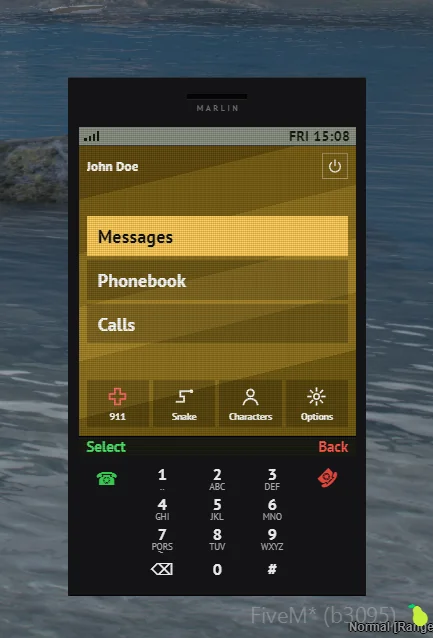
The home screen has Messages, Phonebook and Calls, with 911, Snake, Characters and Options along the bottom.
#Find your number
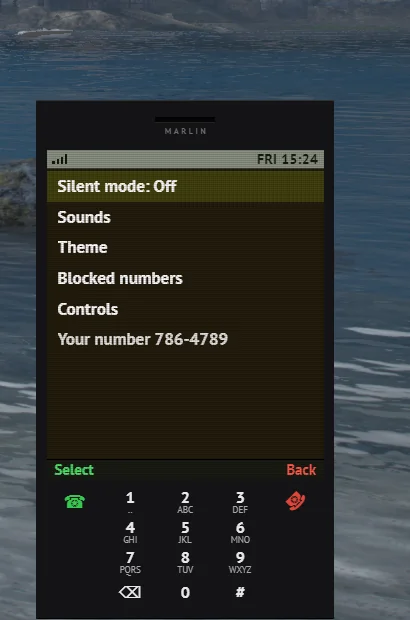
Open Options. Your number is at the bottom of the list. Each character has their own.
#Texts and calls
- Text in game instead of using Discord or DMs. It keeps everything in character.
- Get your friends' numbers from them, then save them in your Phonebook.
- In a conversation, press Enter for options: reply, call, save the number, block or delete.
- When a text comes in, the phone only shows who it's from. Press ↑ to read it.
#Share your location
- In Messages, pick Send my location, or open a conversation and pick it from the options.
- When someone sends you one, press ↑ on the popup to set your GPS to it, or pick Set GPS to their location in the conversation.
#911 and reporting crimes
- Pick 911 on the home screen, or text or call
911. - Choose to report normally or anonymously, then say what's going on.
- When a dispatcher is on, calls and texts to 911 go straight to them.
- When nobody's on dispatch, you're taken to the report screen instead, and every on-duty unit gets it.
- Your location and nearest postal go with every report.
#Silent mode and blocking
- Silent mode in Options keeps calls and texts coming in, just without sound.
- Blocked numbers can't call you, and their texts never arrive. 911 can't be blocked.
#Turning your phone off
Press the power button in the top corner of the home screen when you don't want to be bothered or tracked. Calls go straight to unavailable, and texts wait for you until you turn it back on. Press ↑ to turn it on.
Note
In the future, law enforcement may be able to ping your phone's location if they have a warrant for you.
#When you can't use it
- When you're in handcuffs.
- When you're in jail.